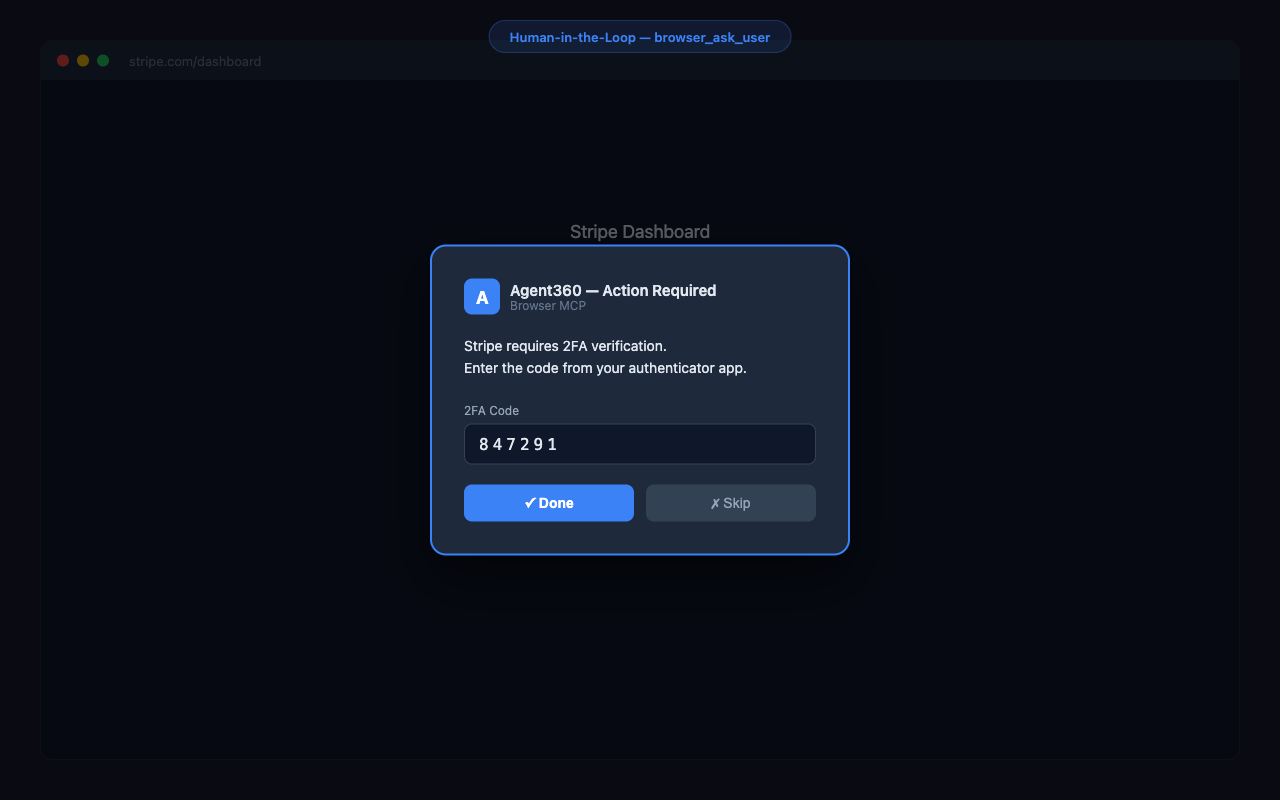
Browser MCP stops and asks you. Then carries on in the Chrome you were already signed into.
Browser MCP is a free, open-source MCP server and Chrome extension that gives your AI agent your real, already-logged-in Chrome - cookies, sessions, 2FA - and works on login-gated sites where headless tools get blocked. It can even read an emailed login code from your Gmail tab and finish the sign-in. Works with Claude Code, Cursor, and VS Code agent mode. MIT, free, runs on your machine.
Browser MCP is two halves - a Chrome extension and a local MCP server. Four steps, about a minute.
Add the MCP serverPaste this in a terminal. Required - the extension does nothing on its own.
claude mcp add --scope user browser-mcp -- npx @agent360/browser-mcp@latest
Restart Claude CodeThat is what starts the server. The extension shows no badge until step 4 - the server only takes a port the first time your agent actually uses the browser. A green badge with the number of connected agents appears then; nothing on the icon before that is normal. (The icon itself never changes colour - it is the badge that turns green.)
Say this, to check it workedPaste it to Claude Code:
Take a screenshot of my current Chrome tab.
You get an image back instead of “I don’t have browser access”. That’s it - you’re running.What else to try →
Using Cursor, VS Code, Codex or Windsurf? Same server, that client’s own config: per-client guides. No Chrome Web Store? The guides cover the unpacked install too.
What's inside
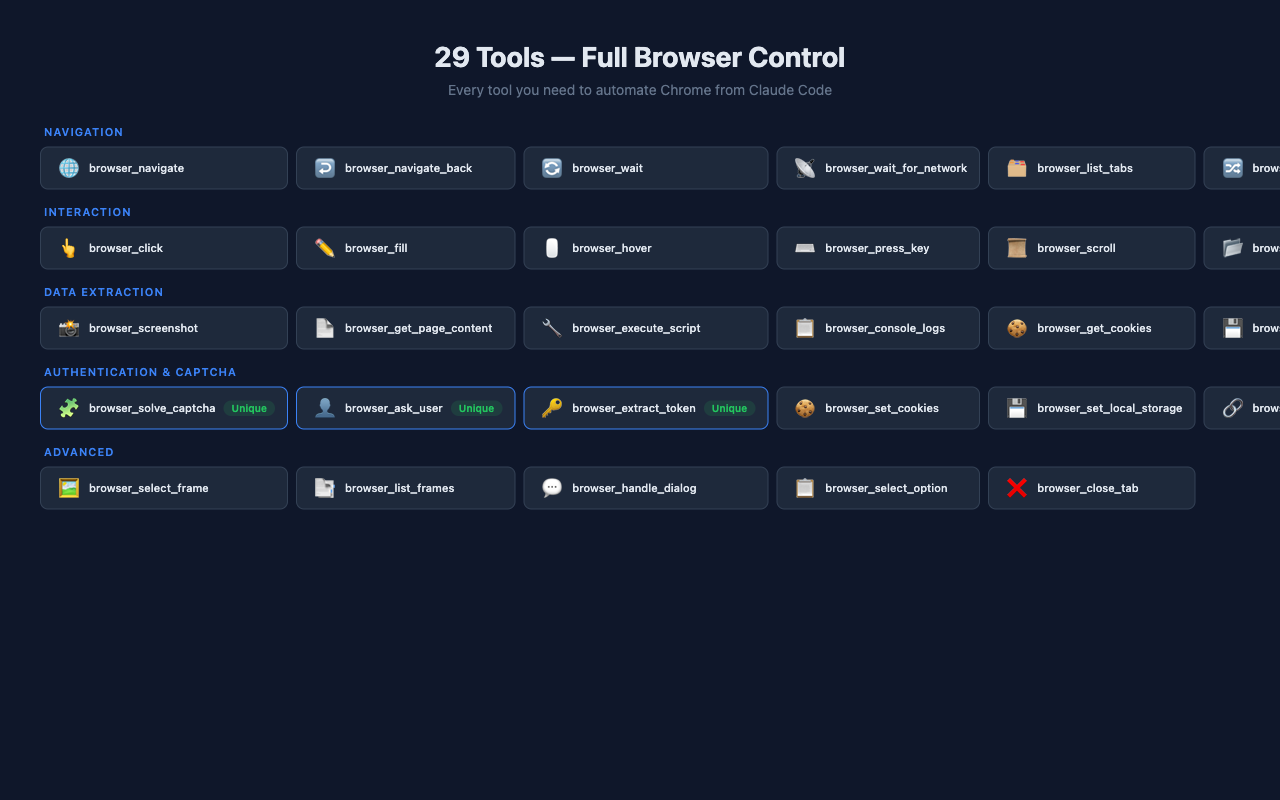
40 tools, 6 built-in capabilities.
🧩
CAPTCHA Assistance
On sites you're authorised to use: detects reCAPTCHA, hCaptcha and Turnstile, attempts the checkbox, then hands the challenge to you. No third-party solving service.
🔀
20 Concurrent Sessions
Each Claude Code conversation gets its own color-coded Chrome Tab Group. No conflicts.
🔐
Human-in-the-Loop
browser_ask_user shows an overlay for 2FA codes, CAPTCHA, credentials. Your AI asks, you answer.
Chrome Debugger API for real mouse/keyboard events. Works on Google Cloud, Stripe, Angular Material.
📡
40 Tools
Navigate, click, fill, screenshot, scroll, hover, fetch, wait for network, solve CAPTCHA, and more.
See it in action
Real Chrome. Real sessions. Real interventions.
Multi-session tab groups
Each AI conversation lives in its own color-coded Chrome group.
Human-in-the-loop
2FA, CAPTCHA, sensitive credentials - the AI asks, you answer in-page.
40 tools, ready to use
Click, fill, navigate, screenshot, fetch, wait, solve CAPTCHA - all callable from Claude Code.
Installed. Now what?
Nothing happens until you ask. Here is what to say - copy one and paste it to your agent.
Start here - does it work?Take a screenshot of my current Chrome tab.If you get an image back instead of "I don't have browser access", both halves are talking to each other. That is the whole install test.
Open my Gmail tab and tell me who sent my last 3 emails.This is the one that shows the difference. It works because it is your browser, already signed in - a headless tool would hit a login wall here.
Go to my analytics dashboard, pull this month's numbers, and put them in a table.Any dashboard you are already logged into. No API key, no export, no integration to build first.
Fill in this signup form with my details. Stop and ask me before anything sensitive.The agent works the page while you stay in the loop - it hands control back for passwords, payment details, or anything it should not decide alone.
Log me in here. If it emails a code, read it from my Gmail tab and continue.The move no API can make: it reads the one-time code out of your own inbox and finishes the sign-in.
Walk through my app's signup flow as a real user and tell me where it breaks.End-to-end QA of your own product, in the same browser your users have - cookies, extensions, session and all.
The pattern: anything you would do yourself in a browser, on a site you are already signed into. It is strongest where there is no API - internal dashboards, admin panels, portals, LinkedIn. Built something good? Add it to the gallery.
Why Browser MCP?
How it stacks up against other browser-control MCPs.
At-a-glance; every figure is dated and sourced on our comparison pages. BrowserMCP.io cells marked "Not documented" were not audited, not confirmed absent.
Own profile by default; your real Chrome via their extension
Your real Chrome
Already logged in
Yes
Yes, in extension mode
Yes
CAPTCHA assistance
AI + auto-click + human
None
Not documented
Multi-session
20 concurrent
One tab group per client
Not documented
Human-in-the-loop
browser_ask_user
None
Not documented
Provider integrations
9 built-in
None
Not documented
Tool count
40
73
Not published
Install
claude mcp add --scope user browser-mcp -- npx @agent360/browser-mcp@latest
npx @playwright/mcp
npm + extension
Frequently asked
I installed the extension from the Chrome Web Store and it says “not connected”. What now?
That is expected - the extension is only half of it. Browser MCP is an extension plus a local MCP server, and the store can only give you the extension. Register the server with your agent - for Claude Code that is claude mcp add --scope user browser-mcp -- npx @agent360/browser-mcp@latest - then restart it. The popup keeps saying "Not connected" until you ask your agent to use the browser for the first time - that is when the server takes a port, and that is when the green badge appears. The server runs on your machine on ports 9876–9895; the extension scans those ports to find it.
What is Browser MCP?
Browser MCP is a free, open-source MCP server and Chrome extension that lets an AI agent (Claude Code, Cursor, VS Code) control your real, already-logged-in Chrome instead of a fresh headless browser. It works on 2FA-, CAPTCHA- and login-gated sites where headless tools get blocked, and runs on your own machine - nothing is sent to us.
How is this different from Playwright MCP?
Playwright MCP is a fine tool, and it is not headless-only - Microsoft's own README documents a persistent profile as the default, plus a browser extension. The difference is concurrency: their docs state that a persistent profile can only be used by one browser instance at a time, so concurrent MCP clients sharing a workspace will conflict. Browser MCP runs up to 20 agent sessions against the same logged-in Chrome, each in its own tab group.
Is my data safe? What does the extension see?
Nothing is sent to Agent360 - there is no server of ours to send it to. The extension talks to an MCP server on 127.0.0.1 that you started; there is no telemetry and no analytics. What your agent reads is handed to your AI client, which sends it to its model provider like anything else you show it. Cookies and tokens are read only when your agent explicitly asks. Source is open and auditable on GitHub.
Why does it need so many permissions?
Browser MCP is a developer tool that controls Chrome on your behalf. Each permission has a specific reason: tabs/scripting for navigation and clicking, cookies for token extraction (Stripe/HubSpot/etc.), debugger for real input events on CSP-protected sites like Google Cloud, <all_urls> because the AI must navigate to whatever URL you ask it to. A full per-permission breakdown is on the permissions & data page.
Does it work with anything other than Claude Code?
Yes - it speaks the standard MCP (Model Context Protocol) wire format, so any MCP-compatible client works: Claude Desktop, Cline, Continue, Cursor, etc. Setup is the same: run the local MCP server, point your client at it.
How does CAPTCHA assistance actually work?
Three layers. (1) Auto-detect reCAPTCHA, hCaptcha, Turnstile checkboxes and click them automatically. (2) For image-grid challenges, AI vision identifies cells. (3) If automated assistance fails, browser_ask_user shows an overlay so you can solve the challenge once and the AI continues. Nothing is sent to third-party CAPTCHA services.
Is it really free? What's the catch?
It's MIT-licensed, open source, no paywall. Built and maintained by Agent360 as part of our developer-tools ecosystem. No catch - the catch (if there is one) is that bug reports and PRs are welcome.
How do I uninstall it?
Two parts: remove the Chrome extension from chrome://extensions, and drop the browser-mcp entry from your MCP config (claude mcp remove --scope user browser-mcp, or delete the block from your Cursor/VS Code/Codex config). Nothing was installed globally - npx only caches the package - so there is no leftover state. Full details & permissions.
Get started in about a minute
Install the extension, then run claude mcp add --scope user browser-mcp -- npx @agent360/browser-mcp@latest to add the MCP server. Both halves are required.